We’ve been talking about ACR (automatic content recognition) in blogs and at conferences for quite some time now (most recently, the 10th prediction for second screen trends in 2013). For many players in the ecosystem (including consumers), the ability to trigger an event on the second screen based on what is happening on the first screen is somewhat of a holy grail of enabling technology capabilities. But as we discussed at NAB in April and at IBC in September, this has so far remained elusive in terms of real scale for consumers reached because of the challenges inherent in each of the various approaches.

where digital video meets the 2nd Screen
Showing posts with label ACR. Show all posts
Showing posts with label ACR. Show all posts
Thursday, January 3, 2013

Monday, December 3, 2012
Revisiting Microsoft's Xbox SmartGlass Platform
Last week I had the opportunity to moderate a second screen panel and attend several other panels and presentations at the Variety Entertainment App Summit in LA. While I greatly enjoyed the panel on second screen monetization with YuMe, Magic Ruby, Cinram/1K and MTV, I thought the most eye-opening session was the presentation of Microsoft Xbox SmartGlass by Mark Turner. While I had seen Ron Pessner present something similar back at a 2nd Screen Society in NY last June and I had been playing with the platform at home for the past 2 weeks (and even wrote about it last week), somehow the epiphany of just how big this could be for the entire second screen ecosystem had escaped me. Let me talk you through the key points they get me excited and explain why I spent this weekend re-exploring the platform at home.
Friday, May 4, 2012
My Review of the Walking Dead Second Screen app built by Red Bee Media
There has been a huge amount of discussion in the trade press and blogosphere about what consumers are doing on their second screen and if they should be engaged in them at all. Certainly in this blog, we have discussed that one reason they might want to engage is to get access to more Stimulating content--everything from stats for sports fans to more detailed information about the show or even commerce opportunities.
 Well the Walking Dead FX app built by Red Bee Media is certainly the most stimulating app a fan could hope for. If you are not familiar with the show, it is in essence a show about zombies and the humans who are trying to survive in a world full of them. That means lots and lots of zombies need to be killed--perhaps the attraction of the show itself. This app capitalizes on that fundamental "raison d'etre" of the show--by creating a game out of trying to predict who will kill the most zombies in a particular episode, what will be the most used weapn for the kills, and what the final kill count will be at the end of the show.

Friday, April 20, 2012
Thoughts on Using Audio Sync for Automated Content Recognition in Second Screen Apps
(this originally appeared in Civolution's Vision Newsletter at NAB 2012)


There has been a lot of a debate in the blogosphere and
trade journals about the value of automated content recognition (ACR) to the user
experience and the best way to provide that capability. Let’s start by exploring the value of the
feature first. Most apps are using the
concept of ACR to provide ease of use for the consumer by identifying the show
they are watching and “checking them in” to the show (IntoNow is probably the
most well-known for this, but many others like ConnecTV and Viggle use it as
well). Shazam uses it to provide a
launch point to additional information about a product you are watching in a
commercial. TVplus uses it to provide a
synchronized content experience. There
have been discussions about holding the microphone open (or checking
occasionally) and when the consumer is determined to be watching something
else, to prompt them to change channels (whether for rewards or
otherwise).
Wednesday, February 15, 2012
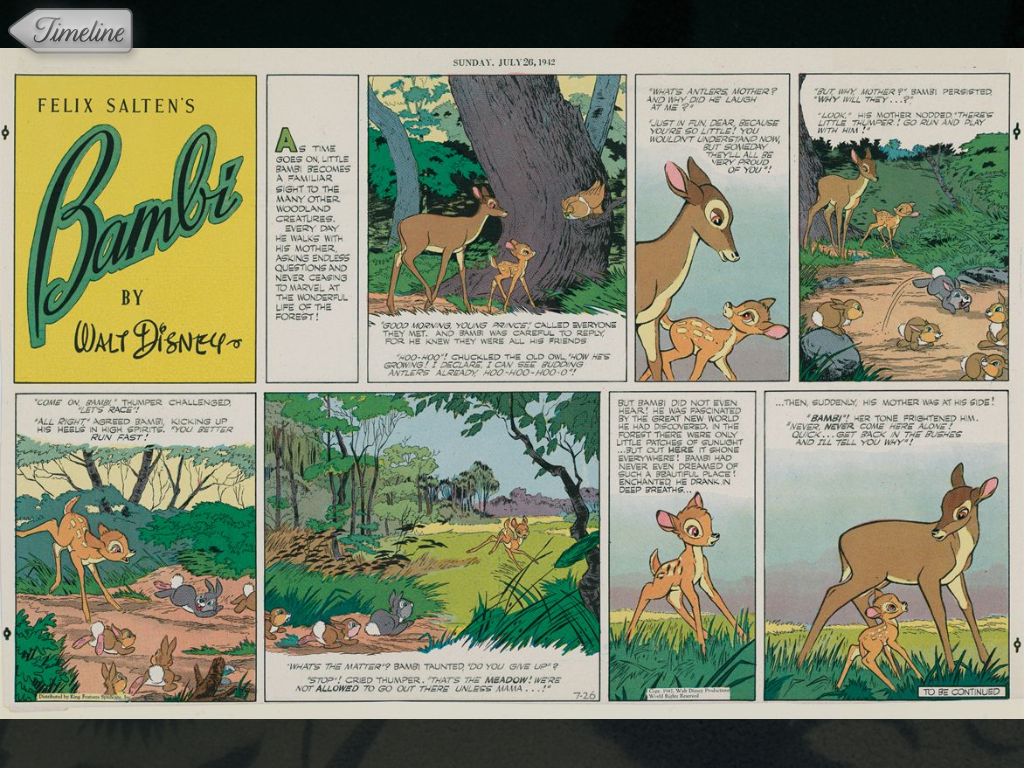
My Second Screen Experience with Bambi on Blu-ray
 Probably the best content driven approach to second screen I have seen yet. The Stimulating nature of the original drawings, trivia, companion comic strips from the 1920s, picture scrambles, and other items were delivered in a UX that was well thought through. An event about every 30-45 seconds, no sound, etc. A very passive and yet engaging experience.
 Not everything was perfect. I tried several times to get the audiosync to work to keep the synchronized content experience on track (provided by TVplus), but to no avail (yes, I did try the volume cranked way beyond normal levels to see if it would work). This is probably why the releases that followed this from Disney (Tron for example) had wi-fi sync in addition to audio sync as an option.
Additionally, Disney did a better job than anyone I have seen in providing a "help" video on-line for their consumers. It should be replicated by everyone else, including those TV shows and networks with dedicated apps for their brands and even by the 3rd party apps that cover multiple shows, titles, networks, etc.


- Simple. No control of the 1st screen. Audio sync also did not work that well.
- Social. I did not find any way to share on Facebook, Twitter, etc.
- Seamless. No integration of other sources of content.
- Stimulating. HIGH. Very High. Great content integration and UX.
- Discovery. No features to help you find new content.


Tuesday, February 14, 2012
Watching a DVR'd episode of SVU with Second Screen
Are you as curious as I am about how the Second Screen apps stack up when it's not live? Do they spoil the ending (Grammy app killed me)? Do they curate Tweets in time with features? Do they even work at all?
I started with Umami, mostly because I haven't used the app for awhile and was looking for improvements. I still like the interface, relatively decent ACR (took 10-15 seconds, struggled at first), and think it has a good balance of both Stimulating and Social features (no Simple, very little Seamless, and no Discovery). Apart from crashing 3 or 4 times, the app did well on what I was expecting in the Stimulating and Social elements. One important thing to note: I am watching a 1-week old show and the ACR works find (except in commercials). It also delivers the tweets based on the show timecodes--so no spoliers! Even though I must be a small minority watching the show a week late, there were tweets which I know had been shared a week ago as other apps (as I jumped around) had them their with their real world time code delivery (date and time that is).


I quickly tried IntoNow (since the recent feature improvements are enticing). I do like their Twitter integration and the ACR worked well, but you can see here that it is real-world timed (meaning spoliers). I swapped to Yap.tv--no ACR (you choose the show), but good social implementation--except all real-world timed, so again spoilers.


I started with Umami, mostly because I haven't used the app for awhile and was looking for improvements. I still like the interface, relatively decent ACR (took 10-15 seconds, struggled at first), and think it has a good balance of both Stimulating and Social features (no Simple, very little Seamless, and no Discovery). Apart from crashing 3 or 4 times, the app did well on what I was expecting in the Stimulating and Social elements. One important thing to note: I am watching a 1-week old show and the ACR works find (except in commercials). It also delivers the tweets based on the show timecodes--so no spoliers! Even though I must be a small minority watching the show a week late, there were tweets which I know had been shared a week ago as other apps (as I jumped around) had them their with their real world time code delivery (date and time that is).


I quickly tried IntoNow (since the recent feature improvements are enticing). I do like their Twitter integration and the ACR worked well, but you can see here that it is real-world timed (meaning spoliers). I swapped to Yap.tv--no ACR (you choose the show), but good social implementation--except all real-world timed, so again spoilers.


No images for TVplus (current favorite list). It did not pick up the ACR and you can't really "tune" the app without it (unfortunately). But ConnecTV did work. Recognized the right episode, but starting showing those sort of random facts that appear to be synchronized with the content but aren't. You noticed this when they start repeating.


Summary: I think Umami did a good job of managing a DVR'd experience. If you think there are other apps that perform similarly (recognizing what you are watching and timing the updates of Tweets, relevant content to the current episode you are watching), please let me know. If you believe the majority of consumers watch time-shifted content, this is a must for them (though clearly the networks want to push all of us to watch live).
Thursday, February 9, 2012
Watching Cowboys and Aliens with Pocket-Blu as a Second Screen Experience
There are some interesting features with this Blu-ray experience, and some UX features that are simply annoying. First, I love the fact that the second screen experience is highly promoted as the Blu-ray starts playback on the first screen. (*Updated with images after blogger.com fixed their issues).


I also like the other titles it shows as having a Second Screen Blu-ray experience. I am not aligned to the titles being tied to an app that that is not discernable until you load the disc (ie no marketing, no consumer launch effort other than the discs which carry it).


The general UI layout was ok once the Blu-ray started and the app detected it was playing. It allowed control of the first screen like a high-end remote, but with the ability to see chapters and events/scenes within chapters.

However, the "materials" that came up as events were always the behind the scenes videos. Granted, they were well synchronized to the playback of the feature, but I could not find a way to turn them off. Every time it tripped across a new event, a video on the second screen would start playing, sound and all. Talk about distracting. It even automatically went to full screen on the tablet each time. In the end, the only way I could figure out how to silence it was by muting my iPad with the external volume control.

I watched an hour of the feature or so and did not encounter any other kind of material (cast information, drawings, etc). I did look to see if there was a way to see something other than videos, but it certainly wasn't obvious if there are other feature types. I did stumble on to this, but could not get it to do anything for my experience (it hung and crashed the app). I think it was designed to let you choose the kind of things that get fired on events, but I could not get it to work.

My overall view is that there are some great concept ideas (multiple features in a single app, marketing of the second screen, etc), but the UX and the related content wasn't thought through or tested on real consumers. Almost, "Great platform potential, needs better title feature consideration."
Simple. Great control of the first screen. High.
Social. There was a Facebook post capability, but not much more. Low.
Seamless. While they displayed other titles, it was only in list form, not in any sense of where you could source those features. None.
Stimulating. Good synchronized effort, just poor choice in content (and no other events other than video--or the UX isn't simple enough to figure that out). I could not find cast information, other sources, etc. Medium.
Discovery. No indication of recommendations, etc. None.

However, the "materials" that came up as events were always the behind the scenes videos. Granted, they were well synchronized to the playback of the feature, but I could not find a way to turn them off. Every time it tripped across a new event, a video on the second screen would start playing, sound and all. Talk about distracting. It even automatically went to full screen on the tablet each time. In the end, the only way I could figure out how to silence it was by muting my iPad with the external volume control.

I watched an hour of the feature or so and did not encounter any other kind of material (cast information, drawings, etc). I did look to see if there was a way to see something other than videos, but it certainly wasn't obvious if there are other feature types. I did stumble on to this, but could not get it to do anything for my experience (it hung and crashed the app). I think it was designed to let you choose the kind of things that get fired on events, but I could not get it to work.

My overall view is that there are some great concept ideas (multiple features in a single app, marketing of the second screen, etc), but the UX and the related content wasn't thought through or tested on real consumers. Almost, "Great platform potential, needs better title feature consideration."
Simple. Great control of the first screen. High.
Social. There was a Facebook post capability, but not much more. Low.
Seamless. While they displayed other titles, it was only in list form, not in any sense of where you could source those features. None.
Stimulating. Good synchronized effort, just poor choice in content (and no other events other than video--or the UX isn't simple enough to figure that out). I could not find cast information, other sources, etc. Medium.
Discovery. No indication of recommendations, etc. None.
Tuesday, February 7, 2012
A Second Screen premier party for The River with Umami, ConnecTV, TVplus and Yap.tv
ABC did a good job of carpet bombing every advertising outlet this week for the premier of "The River", including invading my Twitter feed. A number of Second Screen apps promoted their pending activity for the premier as well, so I had a little party with four of them: UmamiTV, ConnecTV, TVplus and Yap.TV. I tried to create a scenario to walk thru for a consistent review of each app (though brief).
Simple. None of them had any capability to control the first screen. 3 of them used audio ACR to recognize what you were watching, while Yap.TV showed you a list of thumb nails of popular shows there were currently airing for you to select.
Social. I was surprised at little activity there seemed to be tonight on such a highly marketed premier. I started with Umami and opened the Twitter feed. While curated (which I like), it was not time-coded (ie designed to match the timecode of the feature)--so the East Coast spoiled the show's ending for me 30 seconds into it. ConnecTV had the official show Tweets showing, but since my friends aren't my friends in this app, I had no friend tweets/chats showing. Yap.tv had light traffic on it's chat section and did not curate the Tweets, so they flew by on the app (also spoilers). The "Poll" section was empty. TVplus has the best implementation tonight (which surprised me), with fan tweets on one side of the screen and show tweets on the other. They seemed to be semi-curated, but oddly enough the right-hand bottom corner reserved for current tweets was empty the whole show.

Seamless. None of the apps had any method to incorporate multiple sources of content (all relied on live TV guides).
Stimulating. I was looking for some of the basics (the cast, access to things like IMDB or Wikipedia) as well as advanced features like synchronized content. ConnecTV had no cast or links to IMDB or Wikipedia. Yap.TV had no cast or access to simple metadata sites, but did curiously have some random cast photos. Umami had both native cast information and access to IMDB and Wikipedia (and ABC and Google). TVplus had no basic cast information, but did have links to Wikipedia and IMDB. It got a little more interesting on the synchronized content front. Yap.TV and Umami had no synchronized experiences. ConnecTV did have changing content, but I don't think it was synchronized to anything. In fact, the ConnecTV content kept showing facts about the cast constantly (in seeming random order and timing). TVplus had by far the best synchronized experience, showing various factoids, polls, cast information, etc, about the show, but only about every 45 seconds, so it wasn't distracting. The content was also clearly curated and relevant.

Discovery. None of the apps had any discovery features.
I think I was probably most satisfied with my Umami experience for the basic Social and Stimulating features (despite the spoiling) and TVplus for the synchronized content experience. Overall, not an impressive night though. I am guessing the 4 apps were well prepared for the premier but either did not have access to the information before the show aired to make the experience more engaging or didn't have the staff on hand to do so in real-time.
It is early days. We have a long ways to go.
Simple. None of them had any capability to control the first screen. 3 of them used audio ACR to recognize what you were watching, while Yap.TV showed you a list of thumb nails of popular shows there were currently airing for you to select.
Social. I was surprised at little activity there seemed to be tonight on such a highly marketed premier. I started with Umami and opened the Twitter feed. While curated (which I like), it was not time-coded (ie designed to match the timecode of the feature)--so the East Coast spoiled the show's ending for me 30 seconds into it. ConnecTV had the official show Tweets showing, but since my friends aren't my friends in this app, I had no friend tweets/chats showing. Yap.tv had light traffic on it's chat section and did not curate the Tweets, so they flew by on the app (also spoilers). The "Poll" section was empty. TVplus has the best implementation tonight (which surprised me), with fan tweets on one side of the screen and show tweets on the other. They seemed to be semi-curated, but oddly enough the right-hand bottom corner reserved for current tweets was empty the whole show.

Seamless. None of the apps had any method to incorporate multiple sources of content (all relied on live TV guides).
Stimulating. I was looking for some of the basics (the cast, access to things like IMDB or Wikipedia) as well as advanced features like synchronized content. ConnecTV had no cast or links to IMDB or Wikipedia. Yap.TV had no cast or access to simple metadata sites, but did curiously have some random cast photos. Umami had both native cast information and access to IMDB and Wikipedia (and ABC and Google). TVplus had no basic cast information, but did have links to Wikipedia and IMDB. It got a little more interesting on the synchronized content front. Yap.TV and Umami had no synchronized experiences. ConnecTV did have changing content, but I don't think it was synchronized to anything. In fact, the ConnecTV content kept showing facts about the cast constantly (in seeming random order and timing). TVplus had by far the best synchronized experience, showing various factoids, polls, cast information, etc, about the show, but only about every 45 seconds, so it wasn't distracting. The content was also clearly curated and relevant.

Discovery. None of the apps had any discovery features.
I think I was probably most satisfied with my Umami experience for the basic Social and Stimulating features (despite the spoiling) and TVplus for the synchronized content experience. Overall, not an impressive night though. I am guessing the 4 apps were well prepared for the premier but either did not have access to the information before the show aired to make the experience more engaging or didn't have the staff on hand to do so in real-time.
It is early days. We have a long ways to go.
 |
| Umami's curated (not timecoded) Twitter feed |
 |
| ConnecTV's Changing but not synchronized content exp. (w/ ad) |
Wednesday, February 1, 2012
Automatic Content Recognition via Audio
After some discussion last night over dinner, I decided to spend an hour in front of 2 popular TV shows on a major network to see how the audio sync apps worked. I ensured the conditions were the same for every app, testing each of them at least 3 times the same distance from the TV with the sound at a normal level and NO background noise. I repeated the test again on a second show. I tested them all on real-time performance on the West Coast (no DVR'd content). Here's what I found:
- Yahoo IntoNow. Recognized the show within 3-5 seconds every time. No mistakes. No delays. Check-in capability only, but quick and accurate.
- TVplus. Worked 5 of 6 times. Recognized the show within 3-5 seconds. No errors, 1 failed attempt. Synchronized content experience.
- Umami. Worked every time, recognizing the show within 3-5 seconds. No errors. Checkin capability only.
- ConnecTV. Did not work even once. For this app, I did try turning up the volume to no avail.
- Viggle. Did not recognize the first major network show (0 for 3 attempts). Did recognize the 2nd show 2 of 3 times. Took a bit longer than the other apps (3-5 seconds of listening, 3-5 seconds to match). Check-in capability only.
As an industry, if we are going to get consumers to adopt these kinds of experiences on a mainstream basis (ie crossing the chasm), the ability to recognize the show needs to be QUICK and ACCURATE. I still think audio should be a last resort and the industry should focus on synchronizing with the set top box or the "OS" of the OTT delivery (Netflux, Hulu, etc). Blu-ray is of course already easily and very accurately"sync-able".
Once we have accuracy and speed, we can drive better synchronized content use cases (vs. check-in only) for both live and recorded (or on-demand delivered) content. Then we have a real shot at convincing consumers to pick up their 2nd screen and launch their favorite app while they watch TV.
- Yahoo IntoNow. Recognized the show within 3-5 seconds every time. No mistakes. No delays. Check-in capability only, but quick and accurate.
- TVplus. Worked 5 of 6 times. Recognized the show within 3-5 seconds. No errors, 1 failed attempt. Synchronized content experience.
- Umami. Worked every time, recognizing the show within 3-5 seconds. No errors. Checkin capability only.
- ConnecTV. Did not work even once. For this app, I did try turning up the volume to no avail.
- Viggle. Did not recognize the first major network show (0 for 3 attempts). Did recognize the 2nd show 2 of 3 times. Took a bit longer than the other apps (3-5 seconds of listening, 3-5 seconds to match). Check-in capability only.
As an industry, if we are going to get consumers to adopt these kinds of experiences on a mainstream basis (ie crossing the chasm), the ability to recognize the show needs to be QUICK and ACCURATE. I still think audio should be a last resort and the industry should focus on synchronizing with the set top box or the "OS" of the OTT delivery (Netflux, Hulu, etc). Blu-ray is of course already easily and very accurately"sync-able".
Once we have accuracy and speed, we can drive better synchronized content use cases (vs. check-in only) for both live and recorded (or on-demand delivered) content. Then we have a real shot at convincing consumers to pick up their 2nd screen and launch their favorite app while they watch TV.
Subscribe to:
Posts (Atom)